• Skip to main content

Stratus Concept

  • Home
  • News
  • About
    • Privacy Policy
    • GSA
  • Contact
    • Contact
  • Tools

Uncategorized

Jun 09 2015

Buttons and Pins – Sell via websites and Pinterest

Web eCommerce sites are nice. You get to control all aspects of the branding and buying experience, but this comes at the price of having to get buyers to your store’s site.

What buyers want is to be able to buy on the spot. First can buttons that could be easily added to websites. PayPal and Shopify but provide these. The latest development comes from Shopify with Buyable Pins for Piniterest.

Shopify and Pinterest worked together let customers buy your products without leaving the Pinterest app. Any product from your Shopify store that gets pinned in Pinterest will automatically become a Buyable Pin. The great think about this for you is that it is another channel for your products without a lot of extra effort.

Shopify is currently the only way for small and medium-sized businesses to sell using Buyable Pins on Pinterest. Customers can checkout right on Pinterest.  When a customer is ready to make the final purchase, they can now checkout using a credit card or Apple Pay without having to leave the Pinterest app.

To sell products on Pinterest, all you need to do is add the new Pinterest sales channel to your Shopify account. This will automatically enable Buyable Pins for all of your products found on Pinterest. There’s no additional cost to list or sell products using this new Shopify channel. You can measure customer engagement, track the number of Pins, repins, and orders using the Pinterest Channel Dashboard in your Shopify Administration console.

Reach new shoppers by selling on Pinterest with “Buy It” buttons. Optimized for the mobile experience, Pinners can now choose to purchase an item they love without leaving the site. Learn more about how Shopify has partnered with Pinterest so that you can truly sell anywhere.

Try Shopify for Free today.


Written by postit · Categorized: apps, Uncategorized

May 18 2015

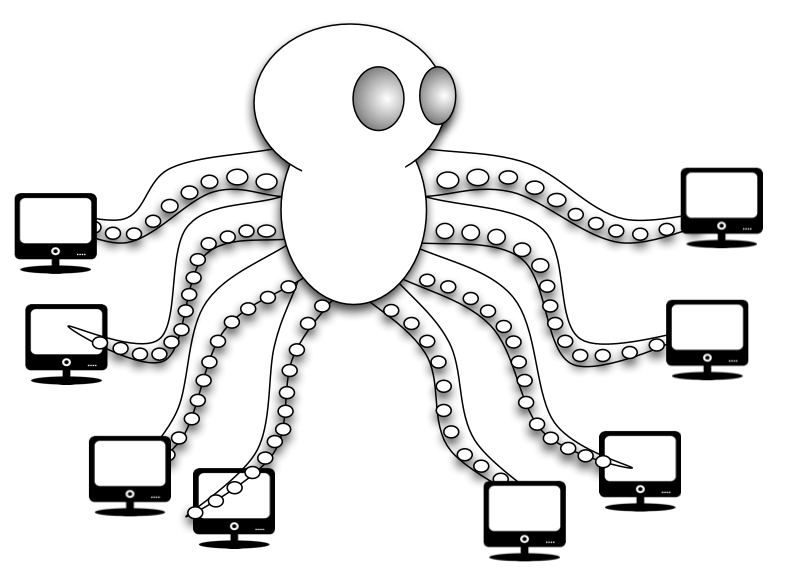
Does your IT staff feel like an octopus?

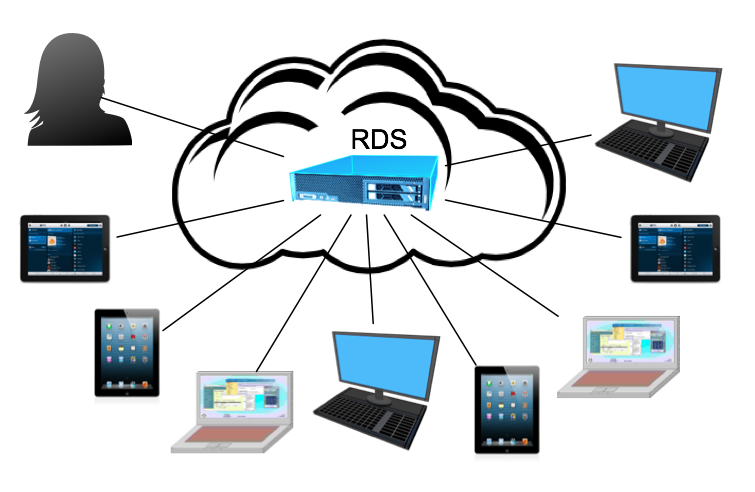
The desktop is the place where most knowledge workers and customer support staff are productive.  IT’s job is to keep these systems running smoothly.  This is fine where there are only a few desktops to manage, and when they are all in on office.  As the number of desktops grow and the number of locations increase, Screen Shot 2015-05-18 at 1.22.50 PMyour IT staff may begin to feel they need 8 arms to manage all the systems.  Virtual Desktops can help tame this management sprawl.

Virtual Desktops

Virtual Desktops are often presented as the next best thing to sliced bread. You probably think that this is somewhat over the top. But if you look closer, Virtual Desktops can solve many of your today’s challenges.

As business owners demand a lower total cost of ownership, better security, greater mobility and a more agile IT infrastructure, the traditional desktop model is defaulting on most of these requirements.

Not identifying your exact requirements while moving towards Virtual Desktops is however your best recipe for failure.

Virtual desktop infrastructure (VDI), and it’s resultant Remote Desktop Service, will not replace traditional desktops and laptops in the way that server virtualization has replaced physical servers, but most industry observers acknowledge that desktop virtualization use cases do offer a large additional value compared to traditional desktop and laptop delivery.

To help you deploy virtual desktops for the right reasons, some examples of common desktop virtualization use cases are Disaster recovery, Security, BYOD, Centralized management.  Lets take a look at these.

Disaster recovery

As business continuity and disaster recovery plans are gaining importance, IT managers increasingly rely on desktop virtualization to provide on-demand access at a failover site. Traditionally, businesses looking at full disaster recovery would store PC inventory at a secondary, stand-by facility where users could come and work in the event that the primary location was unavailable.

With virtualization, IT managers can provision thousands of desktops in a virtual environment.  In the event that access to primary endpoints is not possible, quickly provide access to applications to the staff.

In addition, virtual desktops and modern remote display protocols enable users to gain access to their desktops and applications remotely. Now that mobile devices provide nearly ubiquitous Internet access, workers expect to be able to connect to corporate systems anywhere, anytime via multiple consumer devices.

Security

The increasing mobility of users and their devices makes it harder for IT managers to manage physical desktops and laptops. Viruses, have become more complex and difficult to detect. Desktop virtualization can improve the security in a number of ways.

  • While both physical and virtual machines still have the same Windows operating system, applications and network vulnerabilities, desktop virtualization can improve the security of data at rest. Company data on laptops or desktops is no longer stored in unsecured environments; it is now stored within the walls of the data center.
  • Using multiple operating system instances or application virtualization technologies can isolate applications. Separate virtual desktop environments can be used to access sensitive data, providing an additional layer of separation and security.
  • In addition, , non-persistent desktops can revert the desktop operating system and applications back to a known-good state. IT-controlled virtual desktops in the data center can be more reliably updated with antivirus signature files, patches and updates. Data from desktops can be backed up or collected with electronic discovery systems.

Bring your own device

With bring your own device (BYOD), worker-owned, external devices are being brought into the company network, and some users prefer personal devices over corporate-provided ones. Desktop virtualization can provide an alternative path to accessing applications while relieving IT managers from having to support the endpoints themselves. Another benefit may be that by subsidizing partial costs for users who choose to bring their own devices could reduce the capital expense of user laptops and desktops.

Centralized Management

Screen Shot 2015-05-18 at 1.22.27 PMReducing the total cost of ownership of desktops and laptops is a key objective for IT departments. Traditional desktop and laptop management systems can add significant complexity and increase the cost of supporting users, especially when users may be across multiple geographic locations. Plus, managing those desktops and laptops can require numerous applications, including those for application deployment, inventory, OS management and antivirus protection. Virtualization makes it easier to centrally manage and support users’ desktops. Plus, you have more control over app deployment, user access and other management tasks.

Written by postit · Categorized: Uncategorized

  • « Go to Previous Page
  • Page 1
  • Page 2

· Copyright © 2026 · Stratus Concept LLC ·

Manage Cookie Consent
To provide the best experiences, we use technologies like cookies to store and/or access device information. Consenting to these technologies will allow us to process data such as browsing behavior or unique IDs on this site. Not consenting or withdrawing consent, may adversely affect certain features and functions.
Functional Always active
The technical storage or access is strictly necessary for the legitimate purpose of enabling the use of a specific service explicitly requested by the subscriber or user, or for the sole purpose of carrying out the transmission of a communication over an electronic communications network.
Preferences
The technical storage or access is necessary for the legitimate purpose of storing preferences that are not requested by the subscriber or user.
Statistics
The technical storage or access that is used exclusively for statistical purposes. The technical storage or access that is used exclusively for anonymous statistical purposes. Without a subpoena, voluntary compliance on the part of your Internet Service Provider, or additional records from a third party, information stored or retrieved for this purpose alone cannot usually be used to identify you.
Marketing
The technical storage or access is required to create user profiles to send advertising, or to track the user on a website or across several websites for similar marketing purposes.
  • Manage options
  • Manage services
  • Manage {vendor_count} vendors
  • Read more about these purposes
View preferences
  • {title}
  • {title}
  • {title}